

What this gives you
IAM Federation stops Hoop from sharing one Google service-account key across your team. Each user’s GCP activity runs under their own principal, so abq query Alice runs through Hoop shows up in Cloud Logging as Alice.
You get:
- Per-user attribution. Every GCP operation ties to the person who ran it.
- No shared keys. Users never hold a long-lived service-account key. Hoop mints short-lived tokens at session time.
- A clean audit trail. GCP records who ran each query, and for
gcp_iam, through whom.
Two ways to federate
Hoop ships two built-in GCP providers. Both deliver per-user attribution with no shared static key. They differ in what you provision on the GCP side and whose identity lands in the audit log.How It Works
A user runshoop connect my-bq. The gateway reads the connection’s federation policy, mints a short-lived token for that user, and hands it to the agent for the session. The minting step depends on the provider:
- gcp_iam (service-account impersonation)
- gcp_oauth (per-user OAuth)
1
Reads the federation policy
The policy defines the identity template, project id, and fallback rules that map the Hoop user to a GCP service account.
2
Mints a token as the user's principal
The gateway asks Google’s
iamcredentials API to mint a short-lived OAuth access token as the user’s target service account, using the admin service account stored for your organization.3
Hands the token to the agent
The agent uses that short-lived token for the session. Every operation after that runs as the user’s service account, not the shared admin account.
- The admin service account must be able to impersonate each user’s target principal (the
roles/iam.serviceAccountTokenCreatorgrant). - Each target principal holds the data-plane roles it needs (e.g.
roles/bigquery.userfor BigQuery).
Configure per-user OAuth (gcp_oauth)
This walkthrough sets up the no-service-account mode. For the gcp_iam setup
(admin SA, Token Creator grants, and the connection form), see the
configuration guide.
gcp_oauth works in the web UI. An admin configures it on the connection form
(Step 3), and each user connects their own Google account from the web client
(Step 4). Each step also shows the hoop admin federation CLI flow for
automation.Step 1: Create an OAuth client in GCP (no service accounts)
In the GCP Console for the project that holds your BigQuery data:1
Open Credentials → Create credentials
Go to APIs & Services → Credentials and click + Create credentials.
2
Choose OAuth client ID
From the dropdown, pick OAuth client ID (not API key). It requests user
consent so Hoop can act as each user.
3
Configure the client and add the redirect URI
Set Application type to Web application, give it a name (e.g.
Replace 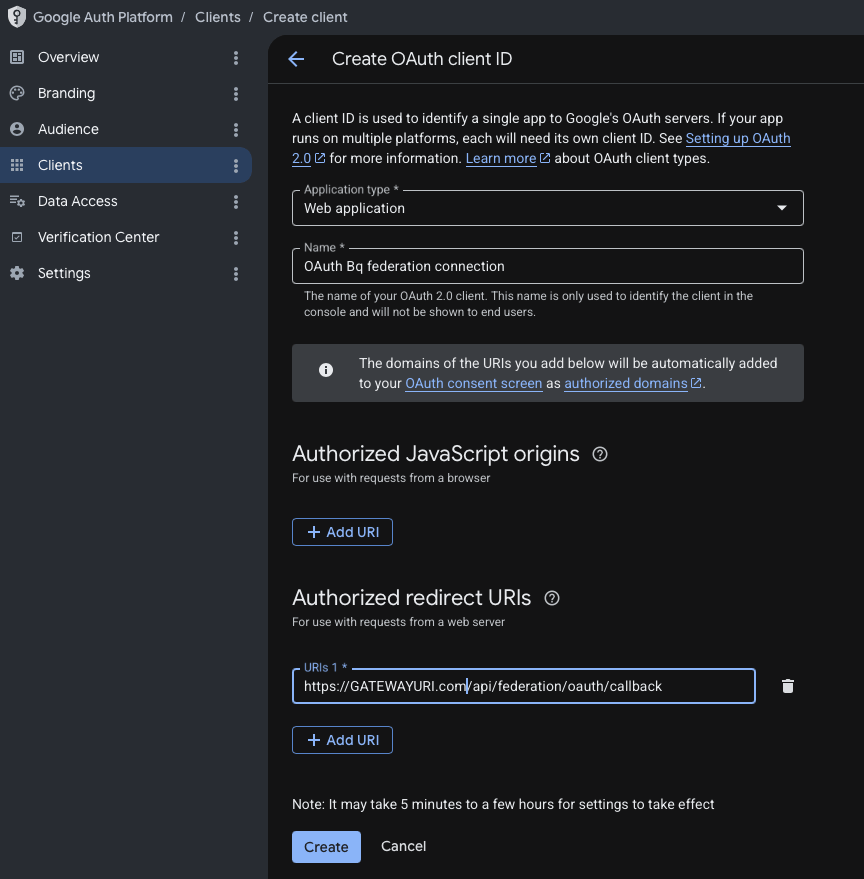
OAuth Bq federation connection), and under Authorized redirect URIs
add your gateway’s API URL plus /api/federation/oauth/callback:GATEWAYURI.com with your gateway host (local dev:
http://localhost:8009/api/federation/oauth/callback). The URI must match
exactly. Click Create.4
Configure the consent screen scopes
On the OAuth consent screen, add the scope
https://www.googleapis.com/auth/cloud-platform (or a narrower data scope,
e.g. BigQuery). Add your users as test users, or publish the app.5
Copy the Client ID and Client secret (or download the JSON)
After you create the client, Google shows the Client ID and Client
secret. Copy them, or click Download JSON.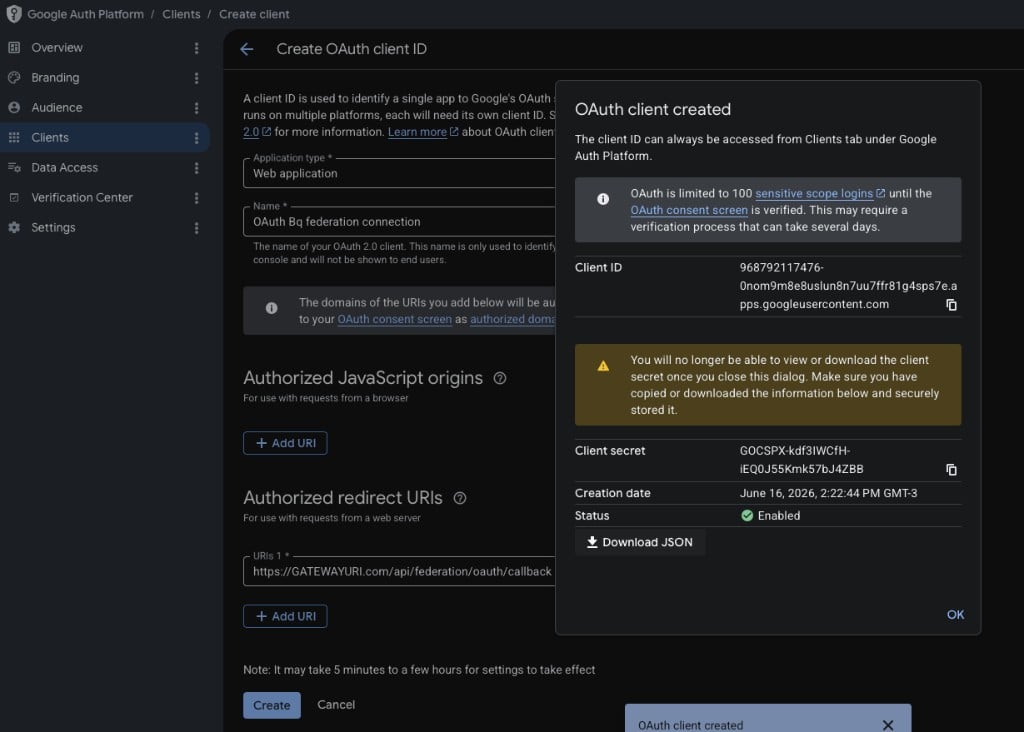
"web" key with extra fields Hoop
doesn’t use. Hoop needs only client_id and client_secret. Pull those two
values into a minimal JSON object:
oauth-client.json for the CLI flow).
Step 2: Grant data roles to each user’s Google account
There are no service accounts to grant. Give each user’s Google identity the data-plane roles it needs. For BigQuery:Step 3: Wire federation onto the connection (admin, one-time)
- Web UI
- CLI
Open the BigQuery connection (or create one), and under Role connection
method choose IAM Federation. Then in Federation setup:
1
Select the GCP OAuth provider
Set Federation provider to GCP OAuth (per-user Google account).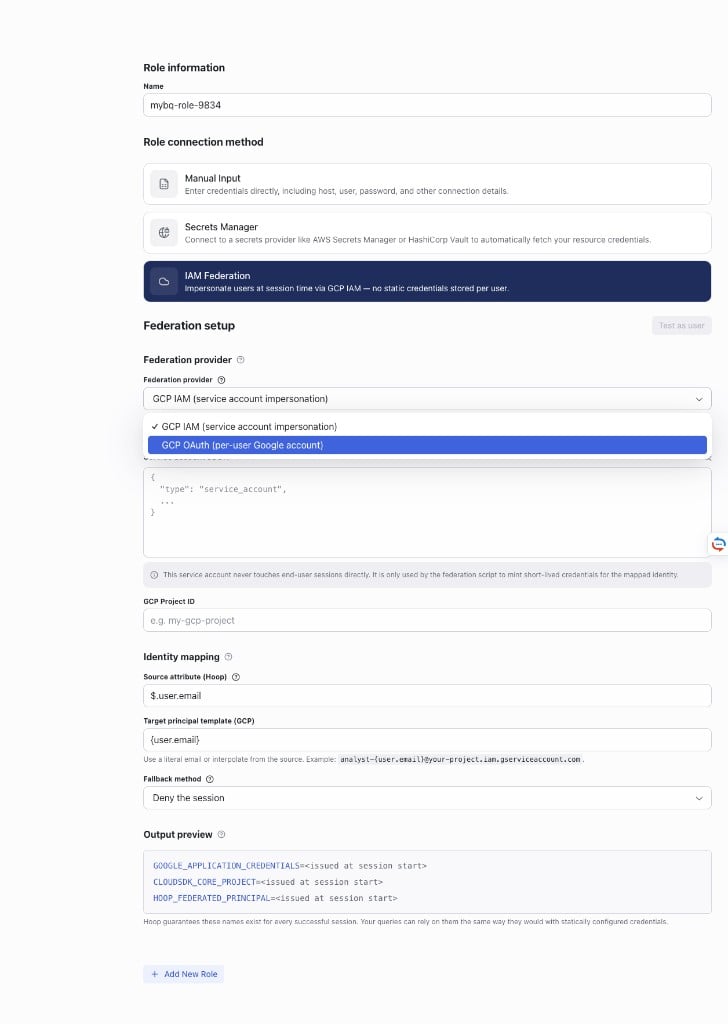
2
Paste the OAuth client credentials
In OAuth client credentials (JSON), paste the minimal
The gateway uses the client secret only to exchange tokens. It never
reaches end-user sessions.
client_id / client_secret JSON from Step 1:3
Set the project and save
Enter your GCP Project ID (e.g. 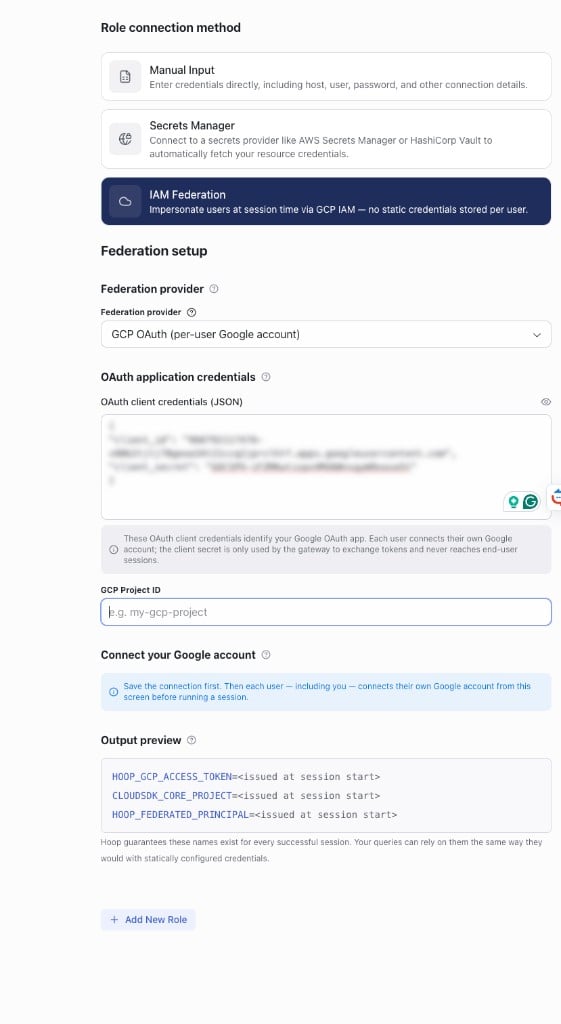
my-proj) and Save the
connection. Selecting gcp_oauth forces the fallback method to Deny
the session, so a session won’t run without a per-user token.Step 4: Each user connects their Google account (one-time)
Each user grants Hoop a refresh token once by approving the Google consent screen with the Google account that should be attributed.- Web client
- CLI / API
Open the federated connection in the web client. If you haven’t connected
yet, a Connect your Google account prompt appears in the editor. Run a
query first and the run is blocked with the same Connect Google account
action inline (“This resource runs queries as you. Connect your Google
account once to authorize access, then run again.”).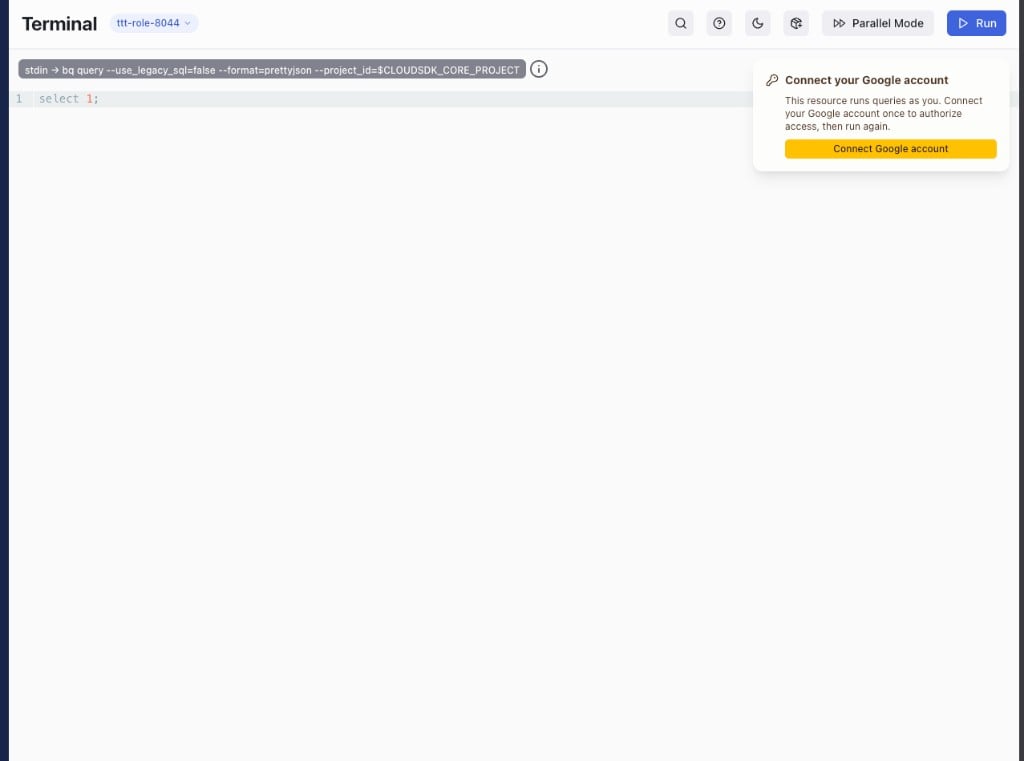
hoop connect my-bq mints a fresh user token per session and
injects HOOP_GCP_ACCESS_TOKEN, CLOUDSDK_CORE_PROJECT, and
HOOP_FEDERATED_PRINCIPAL (and strips any legacy
GOOGLE_APPLICATION_CREDENTIALS).
Test as user doesn’t apply to
gcp_oauth, and the connection form hides it
for this provider. A dry run can’t consent on the user’s behalf, so there’s
nothing to validate ahead of time. Validate by running a real session after
Step 4.Project scope and cross-project queries
The Project ID you set on the connection (extra_config.project_id, injected
into the session as CLOUDSDK_CORE_PROJECT) is not a data boundary. It sets the
default billing and job project: where BigQuery runs and bills each query, and
what unqualified table names resolve against.
It does not limit which data a user can read. The minted token authenticates as
the user (with the https://www.googleapis.com/auth/cloud-platform scope by
default), so a session can query any project the user already has IAM access to.
The user’s own grants govern that, not the connection’s project.
Two things follow:
- One OAuth client covers every connection. For
gcp_oauth, the project where you registered the OAuth client is just the app’s home and has no bearing on data access. Reuse the sameclient_id/client_secretacross your BigQuery connections. - One connection reads across projects. You don’t need a connection per data project. Only the billing project is pinned. Add a separate connection when you want jobs billed to a different project.
Querying a dataset in another project
Qualify the table with the other project’s ID:`project.dataset.table`
(BigQuery Standard SQL; the connection runs with --use_legacy_sql=false). The
job still bills to the connection’s project_id. The reference points wherever
the data lives.
The connection below is pinned to analytics-prod; the data lives in
raw-data-project:
analytics-prod, reading from two other projects):
gcp_oauth, or their target
service account for gcp_iam) needs:
roles/bigquery.jobUseron the billing project (analytics-prod) to create the job, androles/bigquery.dataViewer(or finer) on the data datasets inraw-data-project/customer-projectto read them.
The Audit Trail
Both providers attribute every operation to the individual. The shape of the audit record differs.gcp_iam records a serviceAccountDelegationInfo chain showing who ran the
query (the user’s service account) and through whom (the Hoop admin SA):
gcp_oauth records the user’s Google account as the principal, with no
delegation chain. The human is the caller:
For
gcp_iam, the IAM Federation for GCP configuration guide covers the GCP IAM setup (admin service account, Token Creator grants, verification), wiring the policy onto a connection, and enabling the audit logs. For gcp_oauth, follow Configure per-user OAuth above.Next Steps
Configuration Guide
Grant Token Creator and wire federation onto a connection
CLI Reference
hoop admin federation set and test flag referenceConnect to BigQuery
Create the connection federation attaches to
Session Recording
Audit every federated session inside Hoop