

Components
Gateway
The gateway is the central hub of the system. It handles all user-facing traffic — authentication, authorization, session management, and policy enforcement — and coordinates with agents over a persistent gRPC connection. The gateway runs as a single binary and exposes:- Web UI — browser-based interface for managing resource roles, running queries, reviewing sessions, and approving access requests
- REST API — the same API the web UI uses; available for programmatic access and automation
- gRPC server — the internal transport layer used by agents and native clients to stream data
- Protocol proxies — native protocol listeners (PostgreSQL, SSH, RDP, HTTP) that allow standard tools to connect without any Hoop-specific client
Agent
The agent runs inside your network, close to the resources you want to expose. It establishes an outbound gRPC connection to the gateway — meaning your infrastructure never needs to accept inbound connections. Agents run in two modes:- Standard mode — a persistent long-lived process, managed as a system service. Best for databases, internal APIs, container platforms, and jump hosts.
- Embedded mode — runs alongside an application process, sharing its runtime context. Best for ad-hoc tasks, REPL consoles, and single-resource connections.
Clients
Users connect to resources through:- Web UI — browser-based access with a built-in code editor and terminal
- Native clients — standard tools like
psql,mysql,kubectl, orsshpointed at a local proxy port on the gateway - HTTP proxy — browser or curl access to internal HTTP/HTTPS services via a time-limited session token
Ports
Agents only make outbound connections to port
8010. No inbound ports need to be opened on the agent side.
Session Flow
When a user connects to a resource, the following happens:- Authentication — the user authenticates via your identity provider (OIDC, SAML, or local auth). The gateway verifies the token and loads the user’s identity and group membership.
- Authorization — the gateway checks whether the user has access to the requested resource role, based on access control rules and the resource role’s configured access mode
-
Policy evaluation — before the session begins, the gateway runs the request through an ordered plugin chain:
- Approvals — if JIT approval is required, the session is held until approved
- Audit — the request is logged
- Data masking — DLP rules are applied to inputs and outputs
- RBAC — role-based rules are enforced
- Webhooks / Runbook hooks — external systems are notified
- Agent dispatch — the gateway forwards the session to the agent responsible for that resource role. If the agent is offline, the connection fails.
- Execution — the agent executes the operation against the target resource using native protocols (SQL, SSH, RDP, HTTP, etc.) and streams results back through the gateway.
- Response processing — the gateway applies output-side plugins (data masking, audit logging) before returning data to the client.
Network Architecture
The diagram below illustrates deployment scenarios including Kubernetes and networks with or without inbound connectivity.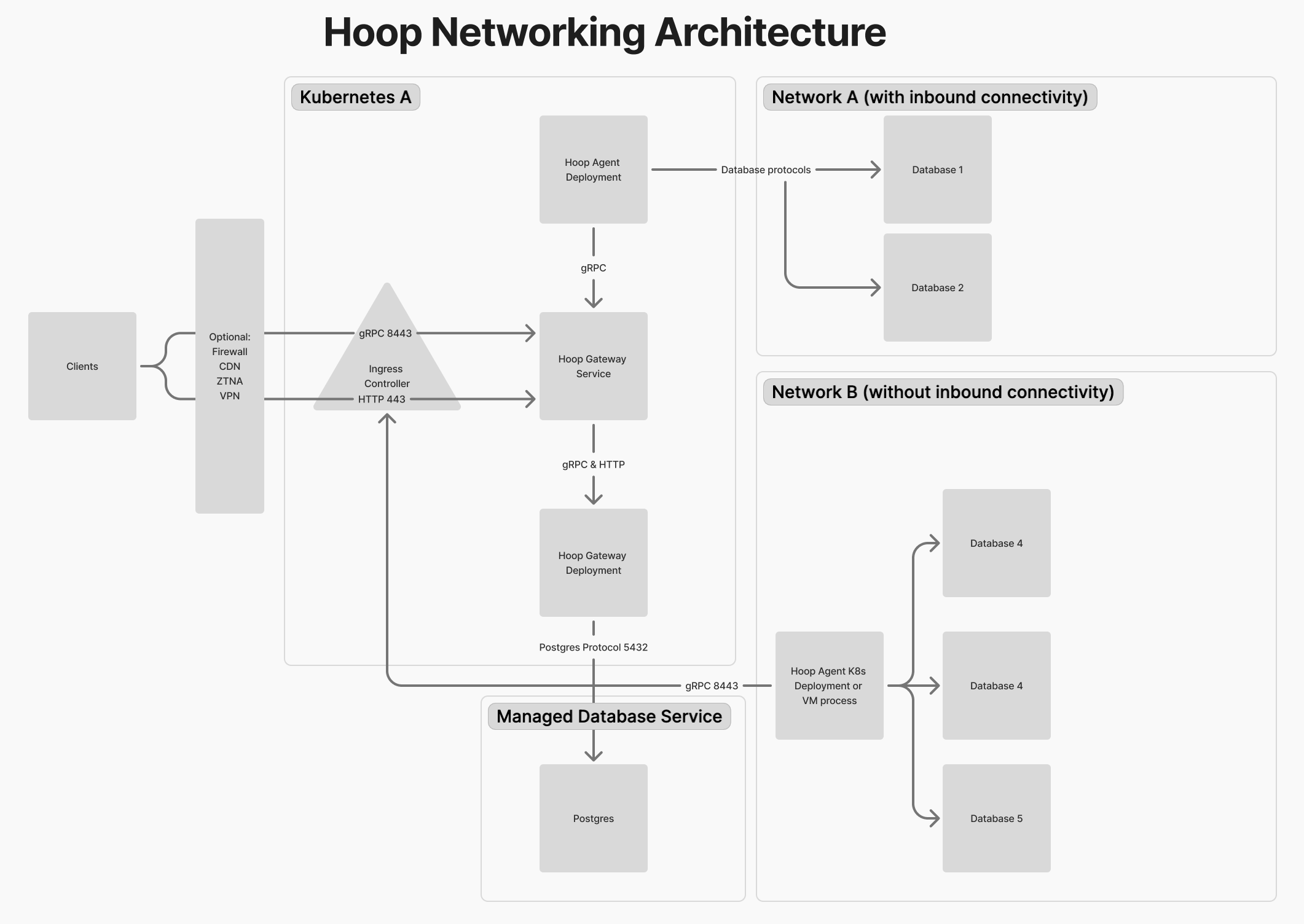
Deployment Topologies
Single Node (Docker Compose)
Suitable for evaluation and smaller deployments. All components — gateway, default agent, PostgreSQL, and optional DLP services — run as containers on a single host. See Docker Compose deployment.Kubernetes
The recommended approach for production. The gateway runs as a pod (or multiple replicas), agents are deployed as separate pods close to your resources, and PostgreSQL is provided by an external managed service (e.g. RDS). Optional components — data masking (Microsoft Presidio) and protocol proxies — can be enabled independently. See Kubernetes deployment.Authentication
The gateway integrates with your identity provider for user authentication. Supported methods:- OIDC / OAuth 2.0 — Okta, Azure AD, Google, Auth0, and any OIDC-compliant provider
- SAML 2.0 — enterprise SSO
- Local — built-in username/password, suitable for self-hosted setups without an external IDP
HOOP_KEY) generated at registration time. Service accounts can be created for programmatic API access.
See Identity Providers for configuration details.