

Sessions Overview
The Sessions page displays a list of all resource role activities with key information:- User who initiated the session
- Resource role name and type
- Session ID for reference
- Timestamp and duration
- Status indicators
Filtering and Search
Use the top filters to narrow down sessions:- User: Filter by specific team members
- Resource Role: View sessions for particular resource roles
- Type: Filter by resource role type (database, application, etc.)
- Period: Select a specific time range
Session Details
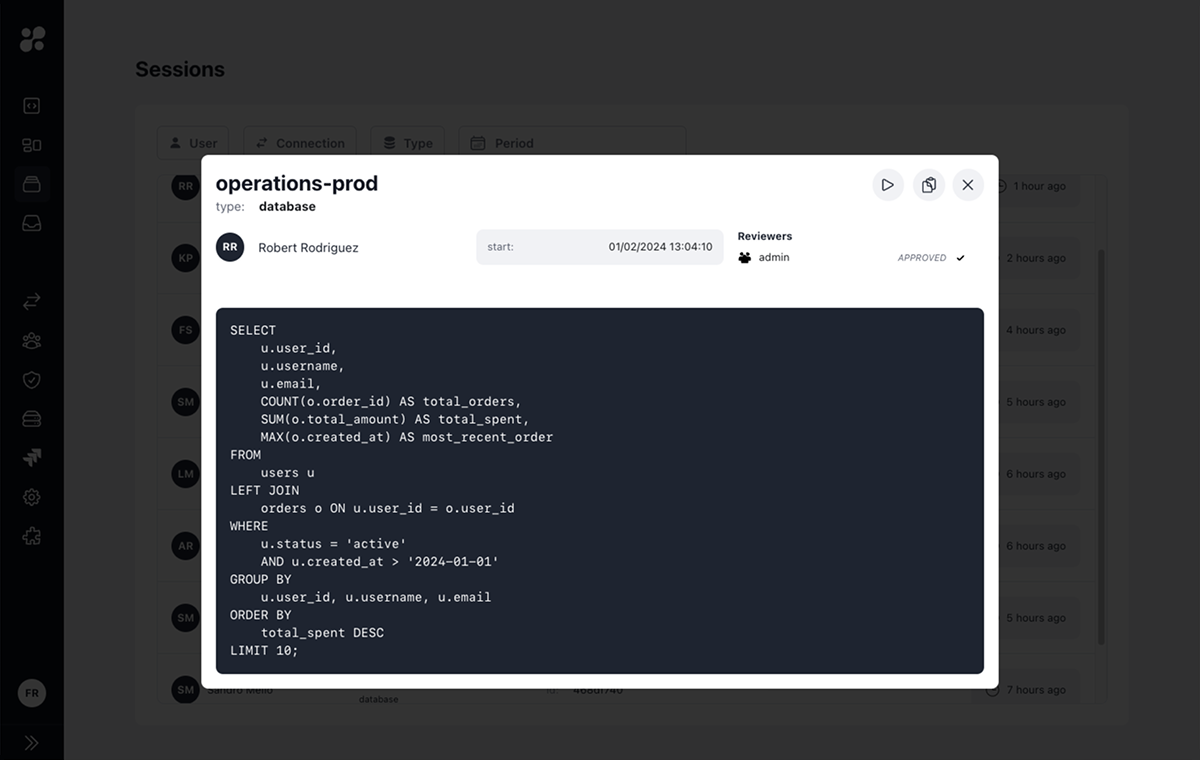
Resource Role Information
- Session start and end times
- Resource role type and name
- User who initiated the session
Activity Log
For database resource roles:- SQL queries executed
- Query results
- Execution timestamps
- Commands executed
- Command output
- Terminal sessions
Session Actions
From the session details view, you can:- Re-run a query to verify results or troubleshoot issues
- Copy session ID for reference
- Download session logs
- Share session details with reviewers
Integration with Access Requests
JIT Access Requests
Sessions may require approval before starting if JIT access requests are enabled for the resource role
Action Access Requests
Individual commands or queries may need approval during the session
Best Practices
Regular Audits
Periodically review session logs for security and compliance
Investigation
Use session IDs to track specific activities during incident response
Compliance
Maintain session records for audit requirements
Performance
Monitor session patterns to optimize resource role usage
Learn More
JIT Access Requests
Learn about session approval workflows
Action Access Requests
Understand command-level approval processes