

psql, or from an application then passes through your guardrails, masking rules and audit trail.


Requirements
- A Supabase project. The free plan works.
- Docker on a host with outbound IPv4 access.
- A Postgres client, such as
psql.
Setup
1
Copy the session pooler host
In the Supabase dashboard, click Connect, open the Direct tab and select Session pooler.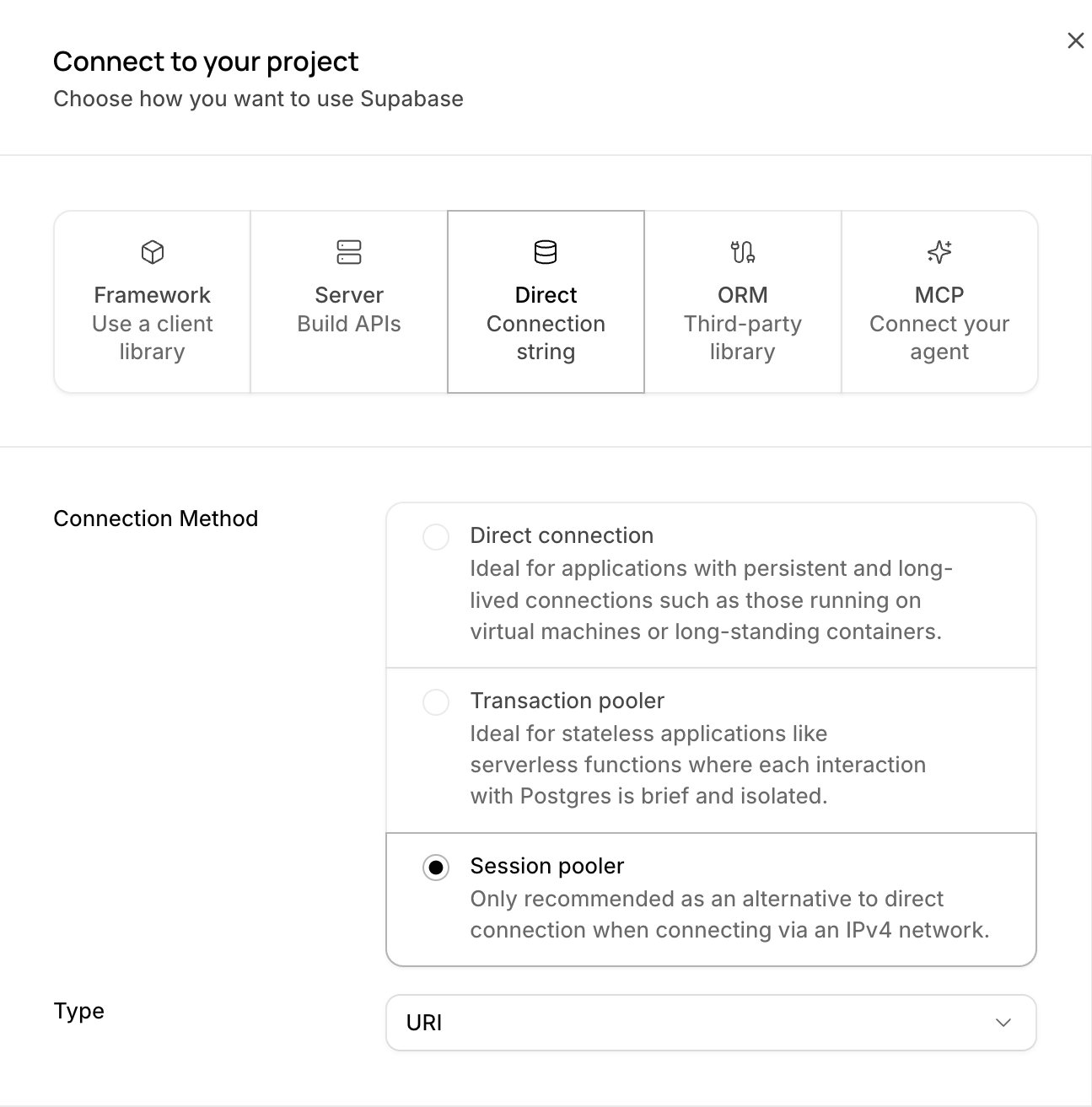
- Host:
aws-0-<region>.pooler.supabase.com. Copy it exactly, because some projects useaws-1. - User:
postgres.<project-ref>.
2
Download the Supabase root certificate
Open Database, then Settings. In SSL configuration, click Download certificate and save the file as 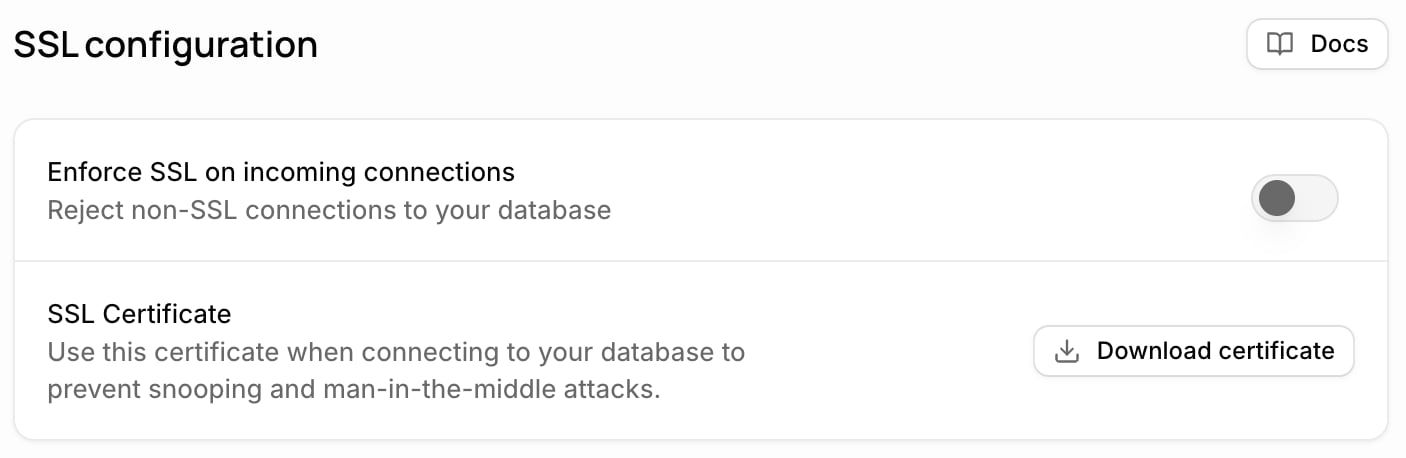
certs/supabase-root.crt.Supabase Root 2021 CA). That CA is not in public trust stores, so the Sidecar needs this file to verify the pooler.3
Write the config
Save this as
config.yaml next to the certs folder. Replace the upstream host with yours.config.yaml
guardrailsblocksDROP,DELETEandTRUNCATE.maskreplaces email addresses in results.auditwrites every statement to stdout as JSON lines, andquery_sessionsturns on the/api/sessionsendpoint.upstream_tlsencrypts the hop to Supabase and verifies it against the root certificate.adminserves health checks and the audit API. It has no authentication, so the next step publishes it on loopback only.
4
Validate and start the Sidecar
--validate prints config OK: 1 listener(s) and the rule counts. Versions are on the releases page.5
Point your clients at the Sidecar
Change the host and port. The user, password and database stay the same. Every client takes the same change: the MCP server or
psql an AI agent uses, a developer’s psql, and application drivers.sslmode=disable applies only to the hop from the client to the Sidecar on the same host. When clients reach the Sidecar over a network, turn on downstream_tls and connect with sslmode=require.Verify
Create a test table through the Sidecar:Allow only the Sidecar with Network Restrictions
Supabase Network Restrictions limit which IP addresses can connect to Postgres and the pooler. Allow only the Sidecar’s egress IP, and no client with another IP can connect to Supabase directly and skip your rules. Workloads that share the Sidecar’s host or NAT gateway keep that access, so give the Sidecar a static egress IP of its own.- Open Database, then Settings, and find Network Restrictions.
- Click Add restriction, then add the Sidecar’s IP as
<ip>/32.
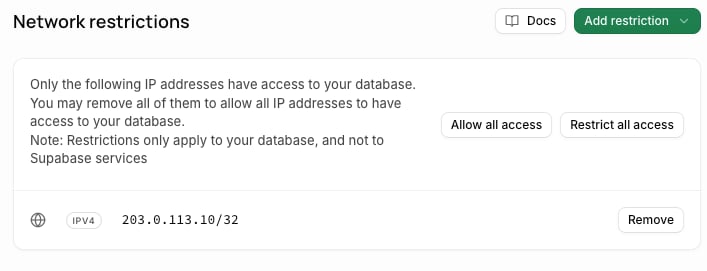
Network Restrictions cover Postgres only, so Supabase’s HTTPS APIs keep working. Edge Functions lose direct database access and must use
supabase-js.Name who ran each statement
By default every client connects aspostgres.<project-ref>, so the audit shows one shared user. Two ways give each statement a name.
A role per person. Create a Postgres role for each person and connect as <role>.<project-ref>. The audit records that role as the principal.
Behavior to know
- A denied statement closes the connection. The client reads the message as
FATAL42501, and Postgres rolls back the open transaction. Connection pools open a new connection. See denials the user can read. - Supabase errors reach the client unchanged. A login or Network Restrictions failure reads the same with or without the Sidecar.
- The Sidecar removes channel binding. It offers
SCRAM-SHA-256instead ofSCRAM-SHA-256-PLUS, with the same password. See TLS on each leg.
Free and Enterprise
Free tier: one Data Masking rule and one Guardrail per Sidecar are free, forever. Running more than one rule per feature, or managing rules centrally across Sidecars, requires Enterprise.
- More rules: an Enterprise license with the guardrails and data-masking features lifts the one-rule caps, with or without a Control Plane. In Docker, pass it with
-e HOOP_LICENSE="$(cat license.json)". See Licensing. - Reviews and central management: connect the Sidecar to a Control Plane, which also needs an Enterprise license. It adds reviews, shared rule sets and one view of many Sidecars.
Next
Guardrails
Write rules that block statements by operation, table or content.
Data Masking
Choose entity types, columns and masking strategies.
PostgreSQL
What the Postgres lane decodes, terminates and masks.
Config File Reference
Every section and field of
config.yaml.