

<org>-<account>.snowflakecomputing.com, so one http lane fronts all of them.
Clients keep their connection settings. They resolve the account host to the Sidecar and trust its certificate. Every request from an AI agent on the SQL API, from an application on a Snowflake driver, or from a developer on the Snowflake CLI then passes through your masking rules, your policy and your audit trail.


Requirements
- A Snowflake account and the
ACCOUNTADMINrole. A 30-day trial works. - Docker on a host with outbound HTTPS to the account host.
- A certificate authority your clients trust, and
opensslto issue a certificate from it. - A Snowflake client: the Snowflake CLI, a driver, or
curlfor the SQL API.
Setup
1
Find the account host
Run this in a Snowsight worksheet: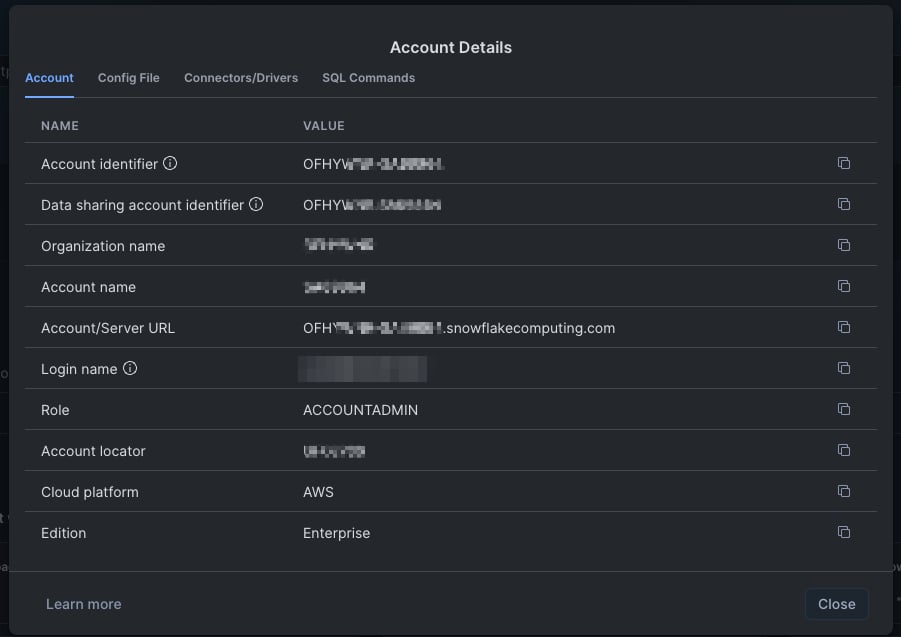
<account-identifier>.snowflakecomputing.com, in lower case. Clients identify the account by this host, so the Sidecar answers to this name and sends it to Snowflake unchanged.2
Issue a certificate for the account host
The Sidecar ends the client’s TLS, so it presents a certificate for the account host, issued by a CA your clients trust. With a private CA:Snowflake drivers check certificate revocation with OCSP. With a certificate from a private CA, the Python connector, the Go driver and the JDBC driver find no OCSP issuer and continue, which is their default fail-open mode.
3
Write the config
Save this as
config.yaml next to the certs folder. Replace <account-host> with yours.config.yaml
maskreplaces email addresses in JSON results.auditwrites every request to stdout as JSON lines, andquery_sessionsturns on the/api/sessionsendpoint.upstream_tlsverifies Snowflake’s certificate against the host trust store and sends the account host as the TLS server name.downstream_tlsends the client’s TLS with the certificate from the previous step.http.capture_bodylets masking and the audit read bodies.max_body_bytesraises the cap to 16 MiB, so a whole inline result fits.adminserves health checks and the audit API. It has no authentication, so the next step publishes it on loopback only.
4
Validate and start the Sidecar
--validate prints config OK: 1 listener(s) and the rule counts. Versions are on the releases page.Docker mounts
config.yaml by inode. After you edit the file, restart the container.5
Point your clients at the Sidecar
Resolve the account host to the Sidecar’s IP: a record in your DNS, a line in
/etc/hosts on a client, or --add-host on a container. Then add ca.crt to the trust store each client reads:Nothing else changes: the same account, user, role, warehouse and authentication method.
6
Pin the JSON result format
Most drivers ask for results in the Arrow format, which the Sidecar does not read. One statement switches every driver to JSON for the whole account:The SQL API, the Node.js driver and the .NET driver use JSON already.
Verify
Query a table with email addresses through the Sidecar. With the Snowflake CLI:Block statements with a policy
Guardrail rules on anhttp lane match the request line, POST /queries/v1/query-request, not the body. operation, pattern_match and deny_words_list rules therefore do not see the SQL. A Rego policy does, because the lane sends each request to OPA with the body in http.body.
policy.rego
config.yaml
DROP TABLE on the SQL API is refused with your message:
The Python connector, the Snowflake CLI and the JDBC driver compress request bodies with gzip, and the Sidecar does not inflate them. The policy reads the SQL from the SQL API, from
curl and from the Go driver.Allow only the Sidecar with a network policy
A Snowflake network policy limits the IP addresses that can reach the account. Create one with the Sidecar’s egress IP and assign it to the users that must go through the Sidecar:ALTER ACCOUNT SET NETWORK_POLICY applies the same list to every user, Snowsight included. Add the IPs of the people who use the web UI, and know that those IPs can reach the account directly.
A programmatic access token needs a network policy on its user. Snowflake refuses to create the token otherwise.
Behavior to know
- Large results skip the Sidecar. Snowflake keeps about 100 KB of rows inline and sends the rest as chunks the client fetches from cloud storage. In the test, 500 rows arrived inline and masked; of 2,000 rows, 1,579 were masked and 421 arrived clear. The SQL API has no chunks: its partitions all come from the account host, and 20,000 rows were masked end to end.
- Arrow results are not read. Without the JSON pin from the last setup step, the Python, Go, JDBC and ODBC drivers receive Arrow and nothing is masked.
- Compressed requests are not read. The Python connector, the Snowflake CLI and the JDBC driver gzip request bodies. Their SQL is not visible to the policy, and the audit stores the compressed body.
- A denial is an HTTP 403. Drivers surface it as an HTTP error, not as a SQL error, and do not retry it.
- The audit stores bodies, the login response included. That response carries the session token. Keep the admin port on loopback and treat the audit output as a secret.
- The principal reads
anonymous. Thehttplane does not read the Snowflake login name yet. - The managed MCP server passes through.
initializeandtools/listwork through the Sidecar. Tool calls were not tested, because trial accounts cannot run them. - No measurable latency.
SELECT 1took 84 ms at p50 direct and 80 ms through the Sidecar, from the same host.
Free and Enterprise
Free tier: one Data Masking rule and one Guardrail per Sidecar are free, forever. Running more than one rule per feature, or managing rules centrally across Sidecars, requires Enterprise.
- More rules: an Enterprise license with the guardrails and data-masking features lifts the one-rule caps, with or without a Control Plane. In Docker, pass it with
-e HOOP_LICENSE="$(cat license.json)". See Licensing. - Reviews and central management: connect the Sidecar to a Control Plane, which also needs an Enterprise license. It adds reviews, shared rule sets and one view of many Sidecars.
Next
Data Masking
Choose entity types, columns and masking strategies.
Policy rules
Guardrail rule types, and OPA for everything they cannot express.
HTTP
What the http lane captures, masks and terminates.
Config File Reference
Every section and field of
config.yaml.