How the AI Session Analyzer catches dangerous queries before they hit production
Access controls check who's allowed. Nothing checks what's safe.
An engineer has the right credentials, role, and authorization to query production. They write a SELECT * on a table with 400 million rows and no index on the filter column.
The permissions check passes. The command runs. The table locks. The incident that brought them to the terminal gets worse.
Nothing in the access control layer had a reason
Free White Paper
GCP Security Command Center + Sarbanes-Oxley (SOX) IT Controls: The Complete Guide
Architecture patterns, implementation strategies, and security best practices. Delivered to your inbox.
Coleman Nye
How the AI Session Analyzer catches dangerous queries before they hit production
An engineer has the right credentials, role, and authorization to query production. They write a SELECT * on a table with 400 million rows and no index on the filter column.
The permissions check passes. The command runs. The table locks. The incident that brought them to the terminal gets worse.
Nothing in the access control layer had a reason to stop it. The command was allowed, but it wasn't safe.
A DELETE WHERE status = 'inactive' is harmless on a 500-row staging table. On a 50-million-row production table, it's an outage. The danger of a command isn't in its syntax. It's in its context. And access controls don't check context.
Now consider the other side. An approver reviews 50 production access requests in a morning.
81% of AI agents already touch production. Only 14% have full security approval. The commands are flowing. The oversight hasn't caught up.
The approver sees raw SQL and a username. They don't see the table size, the missing index, or the lock implications. The review becomes a gut check instead of an informed decision.
These are two sides of the same gap. Nothing between the command and the database understands what's about to happen. That's why dangerous commands slip past permissions. And it's why the humans who catch them can't keep up.
What the Session Analyzer Does
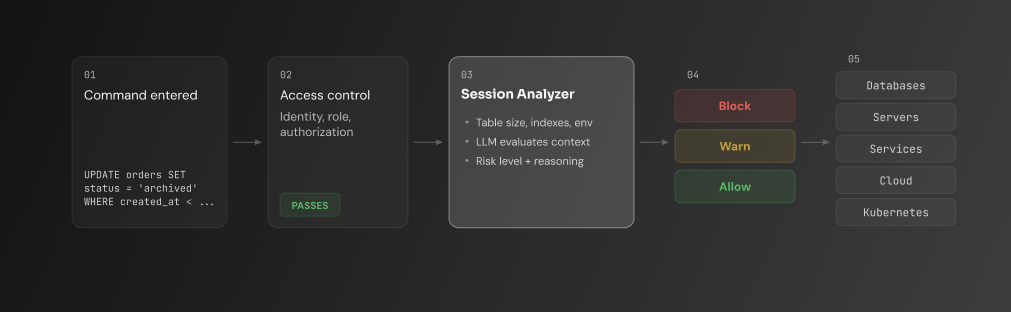
The AI Session Analyzer sits at the moment of execution inside the Web Terminal. Before a command reaches the database, it evaluates what the command will do.
A SELECT * against a 400-million-row table with no index? The Analyzer flags it as high risk, explains the lock implications, and blocks it before it runs. The engineer sees why. The approver sees why. The audit log sees why.
The engineer never asked for any of it.
Invisible until it matters
There's no chat window or prompt to interact with. The Session Analyzer is invisible until it detects real risk.
Continue reading? Get the full guide.
GCP Security Command Center + Sarbanes-Oxley (SOX) IT Controls: Architecture Patterns & Best Practices
Free. No spam. Unsubscribe anytime.
If the command is clean, it runs. The engineer never knows the Analyzer looked at it. If a risk is detected, a card appears with the risk level, the explanation, and the action taken.
If the policy says block, the command doesn't execute. If the policy says allow with a warning, the engineer sees the assessment and makes the call.
No copilot rewriting your query. A second opinion that only speaks when the stakes are real.
How It Works
An engineer opens the Web Terminal and connects to a production PostgreSQL instance. They type:
UPDATE orders SET status = 'archived' WHERE created_at < '2024-01-01';
Before the command executes, the Session Analyzer pulls context for the orders table: 80 million rows, no index on created_at, production environment.
The assessment: high risk. The UPDATE will scan the full table and lock every matching row. Writes to orders block for the duration. On a table this size, that could mean minutes of downtime.
The admin-defined rule for this resource blocks high-risk write operations. The command doesn't execute. The engineer sees a card explaining the risk: the table size, the missing index, and why the lock would cascade. The blocked session routes to the approval queue with the full analysis attached.
The approver opens the review. Instead of raw SQL and a username, they see the risk level, the reasoning, and the infrastructure context. They make an informed call in seconds.
Three risk categories, focused on what causes real production incidents.
Destructive operations.DROP, TRUNCATE, unbounded DELETE or UPDATE. Commands that delete or overwrite data at scale.
Lock risk. An UPDATE on a high-traffic table grabs row locks and blocks every other transaction waiting to write. The longer the query runs, the wider the blast radius.
Heavy reads without proper indexing. Full table scans on large tables. Queries that burn resources because the right indexes aren't in place.
All three are contextual. The same command can be safe or dangerous depending on the resource, the environment, and the data shape. The Analyzer evaluates the combination, not the syntax in isolation.
The Access Layer Was Missing Context. Now It Has It.
Access controls tell you who's allowed. The AI Session Analyzer tells you what's safe. That's a layer of safety that didn't exist before.
Approvers make confident calls instead of gut checks. Engineers get stopped before damage, not after. AI agents get more access because the guardrail is context-aware, not blanket-permissive.
Two steps to set it up: connect an LLM provider, create your first rule. No agents to install. No new infrastructure. The Analyzer runs inside the Web Terminal you're already using.