> ## Documentation Index
> Fetch the complete documentation index at: https://mintlify.hoop.dev/docs/llms.txt
> Use this file to discover all available pages before exploring further.
# MongoDB Atlas
> Guardrails, data masking and audit in front of a MongoDB Atlas cluster, with no app code change.
The Sidecar runs in your infrastructure, between your MongoDB clients and your Atlas cluster.
Clients point their connection string at the Sidecar. Every command from an AI agent, from a developer in `mongosh` or Compass, or from an application then passes through your guardrails, masking rules and audit trail.

 The Sidecar sees driver connections only. The Atlas UI, including Data Explorer, reaches the cluster inside Atlas, so its traffic does not pass through the Sidecar. Atlas project roles decide who can browse data there.
***
## Requirements
* An Atlas cluster. This page was tested on the free M0 tier.
* A database user with a password.
* Docker on a host with a static public IP.
* A MongoDB client, such as `mongosh`.
***
## Setup
An Atlas connection string starts with `mongodb+srv://`. Its host is a DNS record that lists the cluster members, not a server. The Sidecar connects to one member: the primary.
Ask the cluster which member is primary:
```bash theme={"dark"}
mongosh "mongodb+srv://:@cluster0..mongodb.net/" --quiet --eval 'db.hello().primary'
```
```
ac--shard-00-01..mongodb.net:27017
```
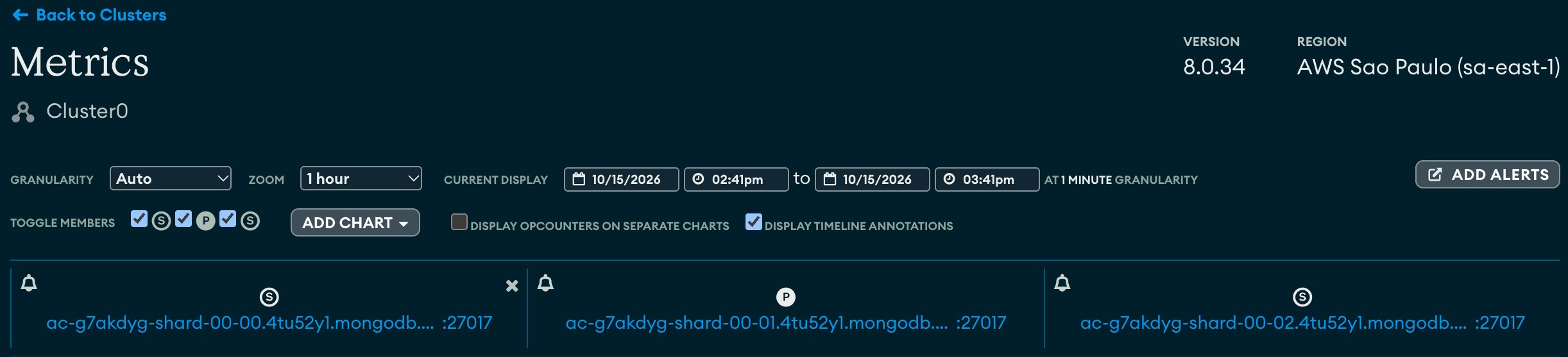
The Atlas UI shows the same. Open the cluster, then the **Metrics** tab. Each member carries `P` for primary or `S` for secondary.
The Sidecar sees driver connections only. The Atlas UI, including Data Explorer, reaches the cluster inside Atlas, so its traffic does not pass through the Sidecar. Atlas project roles decide who can browse data there.
***
## Requirements
* An Atlas cluster. This page was tested on the free M0 tier.
* A database user with a password.
* Docker on a host with a static public IP.
* A MongoDB client, such as `mongosh`.
***
## Setup
An Atlas connection string starts with `mongodb+srv://`. Its host is a DNS record that lists the cluster members, not a server. The Sidecar connects to one member: the primary.
Ask the cluster which member is primary:
```bash theme={"dark"}
mongosh "mongodb+srv://:@cluster0..mongodb.net/" --quiet --eval 'db.hello().primary'
```
```
ac--shard-00-01..mongodb.net:27017
```
The Atlas UI shows the same. Open the cluster, then the **Metrics** tab. Each member carries `P` for primary or `S` for secondary.
 | Host | Use with the Sidecar |
| - | - |
| The primary member, port `27017` | **Yes.** |
| A secondary member | No. Writes fail with `NotWritablePrimary`. |
| The `mongodb+srv://` host | No. It is a DNS record, not a server. |
| A private endpoint host | Not covered on this page yet. M0 and Flex clusters have no private endpoints. |
The primary changes during failovers and maintenance. See [Behavior to know](#behavior-to-know).
Save this as `config.yaml`. Replace the `upstream` host with your primary.
```yaml config.yaml theme={"dark"}
admin:
listen: 0.0.0.0:19000
audit:
file: "-"
query_sessions: 500
guardrails:
rules:
- name: no-destructive-commands
type: operation
operations: [drop, delete]
message: destructive commands are blocked by Hoop
mask:
rules:
- {name: emails, columns: [email], strategy: redact}
listeners:
- name: atlas
protocol: mongodb
listen: 0.0.0.0:27017
upstream: ac--shard-00-01..mongodb.net:27017
upstream_tls: {}
```
* `guardrails` blocks `drop` and `delete` commands.
* `mask` replaces the value of every `email` field in results, nested fields included.
* `audit` writes every command to stdout as JSON lines, and `query_sessions` turns on the `/api/sessions` endpoint.
* `upstream_tls` encrypts the hop to Atlas. Atlas certificates come from a public CA, so the Sidecar verifies them with no extra file.
* `admin` serves health checks and the audit API. It has no authentication, so the next step publishes it on loopback only.
The config holds no database password. The Sidecar relays the login from the client to Atlas.
```bash theme={"dark"}
docker run --rm \
-v "$PWD/config.yaml:/etc/hoop-inspect/config.yaml:ro" \
hoophq/hoopsidecar: hoop start sidecar --validate
docker run -d --name hoop-atlas \
-p 127.0.0.1:27017:27017 -p 127.0.0.1:19000:19000 \
-v "$PWD/config.yaml:/etc/hoop-inspect/config.yaml:ro" \
hoophq/hoopsidecar:
```
`--validate` prints `config OK: 1 listener(s)` and the rule counts. Versions are on the [releases page](https://github.com/hoophq/hoop/releases).
Replace the `mongodb+srv://` string with a `mongodb://` string to the Sidecar. The user and password stay the same. Every client takes the same string: the [MongoDB MCP server](https://github.com/mongodb-js/mongodb-mcp-server) an AI agent uses (`MDB_MCP_CONNECTION_STRING`), `mongosh`, Compass and application drivers.
```
before: mongodb+srv://:@cluster0..mongodb.net/
after: mongodb://:@127.0.0.1:27017/?authSource=admin&directConnection=true
```
* `authSource=admin` was set for you by the `+srv` string. Atlas keeps database users in `admin`.
* `directConnection=true` keeps the driver on the Sidecar. Without it, the driver reads the member list from the server, dials Atlas directly and fails.
* Leave out `compressors=` and `loadBalanced=`. The Sidecar supports neither.
The new string has no `tls=true`. That applies only to the hop from the client to the Sidecar on the same host. When clients reach the Sidecar over a network, put TLS in front of it. See [TLS on each leg](/docs/setup/configuration/hoop-sidecar/protocols/mongodb#tls-on-each-leg).
***
## Verify
Connect through the Sidecar:
```bash theme={"dark"}
mongosh "mongodb://:@127.0.0.1:27017/shop?authSource=admin&directConnection=true"
```
Insert a test document:
```js theme={"dark"}
db.customers.insertOne({ name: "Ana Souza", email: "ana.souza@example.com" })
```
A find returns the email masked:
```js theme={"dark"}
db.customers.find()
```
```
[
{
_id: ObjectId('...'),
name: 'Ana Souza',
email: '[REDACTED:column:email]'
}
]
```
A destructive command is refused with your message:
```js theme={"dark"}
db.customers.drop()
```
```
MongoServerError: destructive commands are blocked by Hoop
```
The audit lists the session with its counts (fields trimmed):
```bash theme={"dark"}
curl -s '127.0.0.1:19000/api/sessions?denied=true'
```
```json theme={"dark"}
{"sessions":[{"principal":"anonymous","protocol":"mongodb","connection":"atlas","denied_count":1,"masked_count":1,"verdict":"denied"}],"total":1}
```
Drivers also open monitoring connections. They show in `/api/sessions` with no statements, so the example filters on `denied=true`.
***
## Allow only the Sidecar with the IP access list
Atlas accepts connections only from the IP addresses on the project's IP access list.
Leave only the Sidecar's egress IP on it, and no client with another IP can connect to Atlas directly and skip your rules. Workloads that share the Sidecar's host or NAT gateway keep that access, so give the Sidecar a static egress IP of its own, such as an Elastic IP.
1. In the Atlas UI, open **Security**, then **Database & Network Access**, then **IP Access List**.
2. Click **Add IP Address** and add the Sidecar's IP.
3. Delete every other entry, including `0.0.0.0/0`.
| Host | Use with the Sidecar |
| - | - |
| The primary member, port `27017` | **Yes.** |
| A secondary member | No. Writes fail with `NotWritablePrimary`. |
| The `mongodb+srv://` host | No. It is a DNS record, not a server. |
| A private endpoint host | Not covered on this page yet. M0 and Flex clusters have no private endpoints. |
The primary changes during failovers and maintenance. See [Behavior to know](#behavior-to-know).
Save this as `config.yaml`. Replace the `upstream` host with your primary.
```yaml config.yaml theme={"dark"}
admin:
listen: 0.0.0.0:19000
audit:
file: "-"
query_sessions: 500
guardrails:
rules:
- name: no-destructive-commands
type: operation
operations: [drop, delete]
message: destructive commands are blocked by Hoop
mask:
rules:
- {name: emails, columns: [email], strategy: redact}
listeners:
- name: atlas
protocol: mongodb
listen: 0.0.0.0:27017
upstream: ac--shard-00-01..mongodb.net:27017
upstream_tls: {}
```
* `guardrails` blocks `drop` and `delete` commands.
* `mask` replaces the value of every `email` field in results, nested fields included.
* `audit` writes every command to stdout as JSON lines, and `query_sessions` turns on the `/api/sessions` endpoint.
* `upstream_tls` encrypts the hop to Atlas. Atlas certificates come from a public CA, so the Sidecar verifies them with no extra file.
* `admin` serves health checks and the audit API. It has no authentication, so the next step publishes it on loopback only.
The config holds no database password. The Sidecar relays the login from the client to Atlas.
```bash theme={"dark"}
docker run --rm \
-v "$PWD/config.yaml:/etc/hoop-inspect/config.yaml:ro" \
hoophq/hoopsidecar: hoop start sidecar --validate
docker run -d --name hoop-atlas \
-p 127.0.0.1:27017:27017 -p 127.0.0.1:19000:19000 \
-v "$PWD/config.yaml:/etc/hoop-inspect/config.yaml:ro" \
hoophq/hoopsidecar:
```
`--validate` prints `config OK: 1 listener(s)` and the rule counts. Versions are on the [releases page](https://github.com/hoophq/hoop/releases).
Replace the `mongodb+srv://` string with a `mongodb://` string to the Sidecar. The user and password stay the same. Every client takes the same string: the [MongoDB MCP server](https://github.com/mongodb-js/mongodb-mcp-server) an AI agent uses (`MDB_MCP_CONNECTION_STRING`), `mongosh`, Compass and application drivers.
```
before: mongodb+srv://:@cluster0..mongodb.net/
after: mongodb://:@127.0.0.1:27017/?authSource=admin&directConnection=true
```
* `authSource=admin` was set for you by the `+srv` string. Atlas keeps database users in `admin`.
* `directConnection=true` keeps the driver on the Sidecar. Without it, the driver reads the member list from the server, dials Atlas directly and fails.
* Leave out `compressors=` and `loadBalanced=`. The Sidecar supports neither.
The new string has no `tls=true`. That applies only to the hop from the client to the Sidecar on the same host. When clients reach the Sidecar over a network, put TLS in front of it. See [TLS on each leg](/docs/setup/configuration/hoop-sidecar/protocols/mongodb#tls-on-each-leg).
***
## Verify
Connect through the Sidecar:
```bash theme={"dark"}
mongosh "mongodb://:@127.0.0.1:27017/shop?authSource=admin&directConnection=true"
```
Insert a test document:
```js theme={"dark"}
db.customers.insertOne({ name: "Ana Souza", email: "ana.souza@example.com" })
```
A find returns the email masked:
```js theme={"dark"}
db.customers.find()
```
```
[
{
_id: ObjectId('...'),
name: 'Ana Souza',
email: '[REDACTED:column:email]'
}
]
```
A destructive command is refused with your message:
```js theme={"dark"}
db.customers.drop()
```
```
MongoServerError: destructive commands are blocked by Hoop
```
The audit lists the session with its counts (fields trimmed):
```bash theme={"dark"}
curl -s '127.0.0.1:19000/api/sessions?denied=true'
```
```json theme={"dark"}
{"sessions":[{"principal":"anonymous","protocol":"mongodb","connection":"atlas","denied_count":1,"masked_count":1,"verdict":"denied"}],"total":1}
```
Drivers also open monitoring connections. They show in `/api/sessions` with no statements, so the example filters on `denied=true`.
***
## Allow only the Sidecar with the IP access list
Atlas accepts connections only from the IP addresses on the project's IP access list.
Leave only the Sidecar's egress IP on it, and no client with another IP can connect to Atlas directly and skip your rules. Workloads that share the Sidecar's host or NAT gateway keep that access, so give the Sidecar a static egress IP of its own, such as an Elastic IP.
1. In the Atlas UI, open **Security**, then **Database & Network Access**, then **IP Access List**.
2. Click **Add IP Address** and add the Sidecar's IP.
3. Delete every other entry, including `0.0.0.0/0`.
 Or with the Atlas CLI. Add the Sidecar's IP, list the entries, then delete each of the others:
```bash theme={"dark"}
atlas accessLists create --type ipAddress --projectId --comment "Hoop Sidecar"
atlas accessLists list --projectId
atlas accessLists delete --projectId
```
Editing the list needs the Project Owner or Project Network Access Manager role.
A connection from any other IP fails before it reaches the database:
```
MongoServerSelectionError: ... SSL alert number 80
. It looks like this is a MongoDB Atlas cluster. Please ensure that your Network Access List allows connections from your IP.
```
If the Sidecar's own IP leaves the list, clients see only `connection closed`. The Sidecar log names the cause: `upstream dial failed` with `upstream TLS handshake: remote error: tls: internal error`.
***
## Behavior to know
* **A denied command closes the connection.** The client reads the rule's message as error code `13`, `Unauthorized`, and an open transaction rolls back. Drivers retry reads and retryable writes on a new connection. Other commands, such as `createIndex`, can fail once with `connection closed`.
* **A failover leaves the Sidecar on the old member.** Atlas elects a new primary during failovers, maintenance and upgrades. Writes then fail with `NotWritablePrimary`, and reads come from a secondary, until you set `upstream` to the new primary and restart the Sidecar. Rule edits reload live; an `upstream` change needs a restart.
* **Sessions show `principal: anonymous`.** The Sidecar relays the login to Atlas and does not read the user name from it, so its audit does not name the database user. Atlas [database auditing](https://www.mongodb.com/docs/atlas/database-auditing/) does, on clusters above the Free and Flex tiers.
* **This page covers password users.** A client's X.509 certificate does not reach Atlas, because the Sidecar opens its own TLS connection.
***
## Free and Enterprise
**Free tier:** one Data Masking rule and one Guardrail per Sidecar are free, forever. Running more than one rule per feature, or managing rules centrally across Sidecars, requires [Enterprise](https://hoop.dev/start).
* **More rules:** an Enterprise license with the guardrails and data-masking features lifts the one-rule caps, with or without a Control Plane. In Docker, pass it with `-e HOOP_LICENSE="$(cat license.json)"`. See [Licensing](/docs/setup/configuration/hoop-sidecar/config-file#licensing).
* **Reviews and central management:** connect the Sidecar to a [Control Plane](/docs/core-concepts/control-plane), which also needs an Enterprise license. It adds reviews, shared rule sets and one view of many Sidecars.
***
## Next
Write rules that block commands by operation, collection or content.
Choose fields, entity types and masking strategies.
What the MongoDB lane decodes, classifies and masks.
Every section and field of `config.yaml`.
This documentation is built and hosted on [Mintlify](https://mintlify.com), a developer documentation platform.
Or with the Atlas CLI. Add the Sidecar's IP, list the entries, then delete each of the others:
```bash theme={"dark"}
atlas accessLists create --type ipAddress --projectId --comment "Hoop Sidecar"
atlas accessLists list --projectId
atlas accessLists delete --projectId
```
Editing the list needs the Project Owner or Project Network Access Manager role.
A connection from any other IP fails before it reaches the database:
```
MongoServerSelectionError: ... SSL alert number 80
. It looks like this is a MongoDB Atlas cluster. Please ensure that your Network Access List allows connections from your IP.
```
If the Sidecar's own IP leaves the list, clients see only `connection closed`. The Sidecar log names the cause: `upstream dial failed` with `upstream TLS handshake: remote error: tls: internal error`.
***
## Behavior to know
* **A denied command closes the connection.** The client reads the rule's message as error code `13`, `Unauthorized`, and an open transaction rolls back. Drivers retry reads and retryable writes on a new connection. Other commands, such as `createIndex`, can fail once with `connection closed`.
* **A failover leaves the Sidecar on the old member.** Atlas elects a new primary during failovers, maintenance and upgrades. Writes then fail with `NotWritablePrimary`, and reads come from a secondary, until you set `upstream` to the new primary and restart the Sidecar. Rule edits reload live; an `upstream` change needs a restart.
* **Sessions show `principal: anonymous`.** The Sidecar relays the login to Atlas and does not read the user name from it, so its audit does not name the database user. Atlas [database auditing](https://www.mongodb.com/docs/atlas/database-auditing/) does, on clusters above the Free and Flex tiers.
* **This page covers password users.** A client's X.509 certificate does not reach Atlas, because the Sidecar opens its own TLS connection.
***
## Free and Enterprise
**Free tier:** one Data Masking rule and one Guardrail per Sidecar are free, forever. Running more than one rule per feature, or managing rules centrally across Sidecars, requires [Enterprise](https://hoop.dev/start).
* **More rules:** an Enterprise license with the guardrails and data-masking features lifts the one-rule caps, with or without a Control Plane. In Docker, pass it with `-e HOOP_LICENSE="$(cat license.json)"`. See [Licensing](/docs/setup/configuration/hoop-sidecar/config-file#licensing).
* **Reviews and central management:** connect the Sidecar to a [Control Plane](/docs/core-concepts/control-plane), which also needs an Enterprise license. It adds reviews, shared rule sets and one view of many Sidecars.
***
## Next
Write rules that block commands by operation, collection or content.
Choose fields, entity types and masking strategies.
What the MongoDB lane decodes, classifies and masks.
Every section and field of `config.yaml`.
This documentation is built and hosted on [Mintlify](https://mintlify.com), a developer documentation platform.