> ## Documentation Index
> Fetch the complete documentation index at: https://mintlify.hoop.dev/docs/llms.txt
> Use this file to discover all available pages before exploring further.

# Monitoring Sessions

> Learn how to track and audit resource role usage through the Sessions interface

export const AuditTrailDemo = () => {
  const COLORS = {
    espresso: "var(--gradient-dark-mid)",
    bronzeDark: "var(--bronze-dark)",
    bronze: "var(--bronze)",
    warmGold: "var(--warm-gold)",
    sand100: "var(--sand-100)",
    sand200: "var(--sand-200)",
    sand300: "var(--sand-300)",
    sand400: "var(--sand-400)",
    sand500: "var(--sand-500)",
    nearBlack: "#111111",
    strong: "#333333",
    body: "#555555",
    secondary: "#777777",
    muted: "#999999",
    error: "#E05A47"
  };
  const COMMANDS = [{
    prompt: "claude-agent@prod $",
    cmd: " SELECT id, name, email, role FROM users WHERE active = true;",
    resultType: "passed",
    resultLabel: "passed",
    detail: "4 fields masked",
    detailColor: COLORS.warmGold
  }, {
    prompt: "claude-agent@prod $",
    cmd: " kubectl get pods -n payments",
    resultType: "passed",
    resultLabel: "passed",
    detail: null,
    detailColor: null
  }, {
    prompt: "claude-agent@prod $",
    cmd: " DROP TABLE customers;",
    resultType: "blocked",
    resultLabel: "blocked",
    detail: "destructive operation",
    detailColor: COLORS.error
  }, {
    prompt: "claude-agent@prod $",
    cmd: " kubectl set image deploy/payments api=api:v2.3.1",
    resultType: "pending-approved",
    pendingLabel: "pending review...",
    approvedLabel: "approved by @sarah.chen",
    detail: null,
    detailColor: null
  }, {
    prompt: "claude-agent@prod $",
    cmd: " kubectl rollout status deploy/payments",
    resultType: "passed",
    resultLabel: "passed",
    detail: null,
    detailColor: null
  }];
  const SESSION_META = {
    agent: "claude-code-agent",
    connection: "prod-us-east (Kubernetes)",
    started: "Mar 21, 2026 · 14:23 UTC",
    duration: "47s",
    status: "Completed",
    summary: "5 commands · 1 blocked · 1 approved · 4 fields masked"
  };
  function useTypewriter(text, speed = 32, startDelay = 0, active = false) {
    const [displayed, setDisplayed] = useState("");
    const [done, setDone] = useState(false);
    const timerRef = useRef(null);
    const intervalRef = useRef(null);
    useEffect(() => {
      if (!active) {
        if (!done) {
          setDisplayed("");
          setDone(false);
        }
        return;
      }
      setDisplayed("");
      setDone(false);
      let i = 0;
      timerRef.current = setTimeout(() => {
        intervalRef.current = setInterval(() => {
          i++;
          setDisplayed(text.slice(0, i));
          if (i >= text.length) {
            clearInterval(intervalRef.current);
            setDone(true);
          }
        }, speed);
      }, startDelay);
      return () => {
        clearTimeout(timerRef.current);
        clearInterval(intervalRef.current);
      };
    }, [text, speed, startDelay, active]);
    return {
      displayed,
      done
    };
  }
  function PlaybackBar({progress, elapsed, total}) {
    return <div style={{
      display: "flex",
      alignItems: "center",
      gap: 10,
      padding: "10px 18px",
      background: "rgba(0,0,0,0.25)",
      borderTop: "1px solid rgba(var(--sand-100-rgb),0.06)",
      fontFamily: "'JetBrains Mono', monospace",
      fontSize: 11
    }}>
        <svg width="12" height="14" viewBox="0 0 12 14" fill="none">
          <path d="M1.5 1v12l9.5-6L1.5 1z" fill={COLORS.warmGold} opacity={0.6} />
        </svg>
        <span style={{
      color: "rgba(var(--sand-100-rgb),0.35)",
      minWidth: 38
    }}>{elapsed}</span>
        <div style={{
      flex: 1,
      height: 3,
      borderRadius: 2,
      background: "rgba(var(--sand-100-rgb),0.08)",
      overflow: "hidden"
    }}>
          <div style={{
      width: `${progress}%`,
      height: "100%",
      background: `linear-gradient(90deg, ${COLORS.warmGold}, ${COLORS.bronze})`,
      borderRadius: 2,
      transition: "width 0.4s linear"
    }} />
        </div>
        <span style={{
      color: "rgba(var(--sand-100-rgb),0.2)",
      minWidth: 38,
      textAlign: "right"
    }}>{total}</span>
      </div>;
  }
  function MetaPanel({visible}) {
    const rows = [{
      label: "AGENT",
      value: SESSION_META.agent
    }, {
      label: "RESOURCE ROLE",
      value: SESSION_META.connection
    }, {
      label: "STARTED",
      value: SESSION_META.started
    }, {
      label: "DURATION",
      value: SESSION_META.duration
    }, {
      label: "STATUS",
      value: SESSION_META.status,
      badge: true
    }, {
      label: "SUMMARY",
      value: SESSION_META.summary
    }];
    return <div style={{
      width: 210,
      flexShrink: 0,
      background: "rgba(0,0,0,0.18)",
      borderLeft: "1px solid rgba(var(--sand-100-rgb),0.06)",
      padding: "18px 16px",
      display: "flex",
      flexDirection: "column",
      gap: 14,
      opacity: visible ? 1 : 0,
      transform: visible ? "translateX(0)" : "translateX(16px)",
      transition: "opacity 0.6s ease, transform 0.6s ease",
      fontFamily: "'Inter', sans-serif",
      overflow: "hidden"
    }}>
        <div style={{
      fontSize: 10,
      fontWeight: 600,
      letterSpacing: "0.1em",
      color: COLORS.warmGold,
      textTransform: "uppercase",
      paddingBottom: 6,
      borderBottom: "1px solid rgba(var(--sand-100-rgb),0.06)"
    }}>Session Details</div>
        {rows.map((r, i) => <div key={i} style={{
      display: "flex",
      flexDirection: "column",
      gap: 2
    }}>
            <span style={{
      fontSize: 9,
      fontWeight: 600,
      letterSpacing: "0.08em",
      color: "rgba(var(--sand-100-rgb),0.25)",
      textTransform: "uppercase"
    }}>{r.label}</span>
            {r.badge ? <span style={{
      display: "inline-block",
      width: "fit-content",
      fontSize: 10,
      fontWeight: 600,
      padding: "2px 8px",
      borderRadius: 99,
      background: "rgba(var(--warm-gold-rgb),0.15)",
      color: COLORS.warmGold
    }}>{r.value}</span> : <span style={{
      fontSize: 12,
      color: "rgba(var(--sand-100-rgb),0.6)",
      lineHeight: 1.4
    }}>
                {r.value}
              </span>}
          </div>)}
        <div style={{
      display: "flex",
      flexDirection: "column",
      gap: 5,
      marginTop: 2
    }}>
          <span style={{
      fontSize: 9,
      fontWeight: 600,
      letterSpacing: "0.08em",
      color: "rgba(var(--sand-100-rgb),0.25)",
      textTransform: "uppercase"
    }}>TAGS</span>
          <div style={{
      display: "flex",
      flexWrap: "wrap",
      gap: 4
    }}>
            {["production", "kubernetes", "claude-code"].map(tag => <span key={tag} style={{
      fontSize: 10,
      padding: "2px 7px",
      borderRadius: 4,
      background: "rgba(var(--sand-100-rgb),0.06)",
      color: "rgba(var(--sand-100-rgb),0.3)",
      border: "1px solid rgba(var(--sand-100-rgb),0.08)"
    }}>{tag}</span>)}
          </div>
        </div>
      </div>;
  }
  function RecordingDot({active}) {
    return <div style={{
      display: "flex",
      alignItems: "center",
      gap: 6,
      opacity: active ? 1 : 0.3,
      transition: "opacity 0.4s ease"
    }}>
        <div style={{
      width: 7,
      height: 7,
      borderRadius: "50%",
      background: active ? "#E05A47" : "rgba(var(--sand-100-rgb),0.2)",
      boxShadow: active ? "0 0 8px rgba(224,90,71,0.4)" : "none",
      animation: active ? "atdRecPulse 1.4s ease-in-out infinite" : "none"
    }} />
        <span style={{
      fontSize: 10,
      fontWeight: 600,
      letterSpacing: "0.06em",
      color: active ? "rgba(var(--sand-100-rgb),0.45)" : "rgba(var(--sand-100-rgb),0.15)",
      textTransform: "uppercase",
      fontFamily: "'Inter', sans-serif"
    }}>REC</span>
      </div>;
  }
  function CommandLine({entry, animate, onDone, delay = 0, approved, cycle}) {
    const [showResult, setShowResult] = useState(false);
    const [showApproved, setShowApproved] = useState(false);
    const {displayed: cmdText, done: cmdDone} = useTypewriter(entry.cmd, 28, delay, animate);
    const resultColorMap = {
      passed: "rgba(var(--sand-100-rgb),0.3)",
      blocked: COLORS.error,
      "pending-approved": COLORS.warmGold
    };
    useEffect(() => {
      if (cmdDone) {
        const t = setTimeout(() => {
          setShowResult(true);
          if (entry.resultType === "pending-approved") {
            const t2 = setTimeout(() => {
              setShowApproved(true);
              setTimeout(() => onDone?.(), 300);
            }, 1200);
            return () => clearTimeout(t2);
          } else {
            const t2 = setTimeout(() => onDone?.(), 400);
            return () => clearTimeout(t2);
          }
        }, 250);
        return () => clearTimeout(t);
      }
    }, [cmdDone]);
    useEffect(() => {
      if (approved && entry.resultType === "pending-approved") {
        setShowApproved(true);
      }
    }, [approved]);
    return <div style={{
      marginBottom: 2
    }}>
        {}
        <div style={{
      display: "flex",
      lineHeight: 2.0,
      whiteSpace: "pre",
      background: entry.resultType === "blocked" && showResult ? "rgba(224,90,71,0.05)" : "transparent",
      borderRadius: 4,
      paddingLeft: 2,
      paddingRight: 2,
      transition: "background 0.4s ease"
    }}>
          <span style={{
      color: COLORS.warmGold,
      opacity: 0.7
    }}>{entry.prompt}</span>
          <span style={{
      color: COLORS.sand100,
      opacity: 0.85
    }}>{cmdText}</span>
          {animate && !cmdDone && <span style={{
      display: "inline-block",
      width: 7,
      height: 15,
      background: COLORS.warmGold,
      marginLeft: 1,
      animation: "atdBlink 0.7s step-end infinite",
      verticalAlign: "middle",
      marginTop: 5,
      borderRadius: 1
    }} />}
        </div>

        {}
        {showResult && <div style={{
      paddingLeft: 20,
      lineHeight: 1.8,
      opacity: 0,
      animation: "atdFadeInLine 0.3s ease forwards",
      display: "flex",
      alignItems: "center",
      gap: 8
    }}>
            {entry.resultType === "passed" && <>
                <span style={{
      fontSize: 12,
      color: resultColorMap.passed,
      fontFamily: "'JetBrains Mono', monospace"
    }}>{entry.resultLabel}</span>
                {entry.detail && <span style={{
      fontSize: 10,
      fontWeight: 600,
      padding: "1px 7px",
      borderRadius: 3,
      background: "rgba(var(--warm-gold-rgb),0.12)",
      color: entry.detailColor,
      fontFamily: "'Inter', sans-serif"
    }}>{entry.detail}</span>}
              </>}
            {entry.resultType === "blocked" && <>
                <span style={{
      fontSize: 12,
      fontWeight: 500,
      color: COLORS.error,
      fontFamily: "'JetBrains Mono', monospace"
    }}>{entry.resultLabel}</span>
                {entry.detail && <span style={{
      fontSize: 10,
      fontWeight: 600,
      padding: "1px 7px",
      borderRadius: 3,
      background: "rgba(224,90,71,0.12)",
      color: COLORS.error,
      fontFamily: "'Inter', sans-serif",
      opacity: 0.7
    }}>{entry.detail}</span>}
              </>}
            {entry.resultType === "pending-approved" && <span style={{
      fontSize: 12,
      color: COLORS.warmGold,
      fontFamily: "'JetBrains Mono', monospace",
      transition: "opacity 0.3s ease"
    }}>
                {showApproved ? entry.approvedLabel : entry.pendingLabel}
              </span>}
          </div>}
      </div>;
  }
  const [phase, setPhase] = useState(0);
  const [metaVisible, setMetaVisible] = useState(false);
  const [progress, setProgress] = useState(0);
  const [cycle, setCycle] = useState(0);
  const [approvedMap, setApprovedMap] = useState({});
  const termRef = useRef(null);
  const totalSteps = COMMANDS.length;
  const handleLineDone = useCallback(index => {
    setPhase(p => {
      const next = p + 1;
      setProgress(next / totalSteps * 100);
      return next;
    });
    if (COMMANDS[index] && COMMANDS[index].resultType === "pending-approved") {
      setApprovedMap(m => ({
        ...m,
        [index]: true
      }));
    }
  }, [totalSteps]);
  useEffect(() => {
    const t = setTimeout(() => setMetaVisible(true), 900);
    return () => clearTimeout(t);
  }, [cycle]);
  useEffect(() => {
    if (termRef.current) {
      termRef.current.scrollTop = termRef.current.scrollHeight;
    }
  }, [phase]);
  useEffect(() => {
    if (phase >= totalSteps) {
      const t = setTimeout(() => {
        setPhase(0);
        setProgress(0);
        setMetaVisible(false);
        setApprovedMap({});
        setCycle(c => c + 1);
      }, 4000);
      return () => clearTimeout(t);
    }
  }, [phase, totalSteps]);
  const fmtTime = pct => {
    const s = Math.round(pct / 100 * 47);
    return `0:${String(s).padStart(2, "0")}`;
  };
  return <div style={{
    width: "100%",
    maxWidth: 860,
    margin: "0 auto"
  }}>
      <style>{`
        @import url('https://fonts.googleapis.com/css2?family=JetBrains+Mono:wght@400;500&family=Inter:wght@400;500;600;700;800&display=swap');
        @keyframes atdBlink { 0%,100%{opacity:1} 50%{opacity:0} }
        @keyframes atdRecPulse { 0%,100%{opacity:1;transform:scale(1)} 50%{opacity:0.3;transform:scale(0.85)} }
        @keyframes atdFadeInLine { from{opacity:0;transform:translateY(2px)} to{opacity:1;transform:translateY(0)} }
        @keyframes atdSlideUp { from{opacity:0;transform:translateY(8px)} to{opacity:1;transform:translateY(0)} }
      `}</style>

      {}
      <div style={{
    background: "linear-gradient(135deg, var(--gradient-dark-start) 0%, var(--gradient-dark-mid) 35%, var(--gradient-dark-end) 70%, var(--bronze) 100%)",
    borderRadius: 12,
    position: "relative",
    overflow: "hidden",
    boxShadow: "0 4px 32px rgba(0,0,0,0.3), 0 1px 4px rgba(0,0,0,0.2)"
  }}>
        {}
        <div style={{
    position: "absolute",
    top: "-30%",
    right: "-10%",
    width: "60%",
    height: "160%",
    background: "radial-gradient(ellipse at center, rgba(var(--warm-gold-rgb),0.12) 0%, transparent 70%)",
    pointerEvents: "none",
    zIndex: 0
  }} />

        <div style={{
    position: "relative",
    zIndex: 1,
    fontFamily: "'JetBrains Mono', monospace",
    fontSize: 13
  }}>
          {}
          <div style={{
    display: "flex",
    alignItems: "center",
    justifyContent: "space-between",
    padding: "11px 18px",
    background: "rgba(0,0,0,0.2)",
    borderBottom: "1px solid rgba(var(--sand-100-rgb),0.06)"
  }}>
            <div style={{
    display: "flex",
    alignItems: "center",
    gap: 7
  }}>
              <div style={{
    width: 9,
    height: 9,
    borderRadius: "50%",
    background: "rgba(var(--sand-100-rgb),0.12)"
  }} />
              <div style={{
    width: 9,
    height: 9,
    borderRadius: "50%",
    background: "rgba(var(--sand-100-rgb),0.12)"
  }} />
              <div style={{
    width: 9,
    height: 9,
    borderRadius: "50%",
    background: "rgba(var(--sand-100-rgb),0.12)"
  }} />
            </div>
            <div style={{
    display: "flex",
    alignItems: "center",
    gap: 8,
    padding: "4px 14px",
    borderRadius: 5,
    background: "rgba(0,0,0,0.15)",
    border: "1px solid rgba(var(--sand-100-rgb),0.04)",
    fontSize: 11,
    color: "rgba(var(--sand-100-rgb),0.25)",
    fontFamily: "'Inter', sans-serif"
  }}>
              <svg width="10" height="10" viewBox="0 0 16 16" fill="none">
                <rect x="2" y="7" width="12" height="2" rx="1" fill="rgba(var(--sand-100-rgb),0.15)" />
                <rect x="7" y="2" width="2" height="12" rx="1" fill="rgba(var(--sand-100-rgb),0.15)" />
              </svg>
              app.hoop.dev/sessions/claude-7f3a
            </div>
            <RecordingDot active={phase < totalSteps} />
          </div>

          {}
          <div style={{
    display: "flex",
    gap: 0,
    background: "rgba(0,0,0,0.12)",
    borderBottom: "1px solid rgba(var(--sand-100-rgb),0.06)",
    fontFamily: "'Inter', sans-serif",
    fontSize: 12
  }}>
            {["Commands", "Timeline", "Replay"].map((tab, i) => <div key={tab} style={{
    padding: "9px 20px",
    color: i === 0 ? "rgba(var(--sand-100-rgb),0.75)" : "rgba(var(--sand-100-rgb),0.2)",
    borderBottom: i === 0 ? `2px solid ${COLORS.warmGold}` : "2px solid transparent",
    background: i === 0 ? "rgba(var(--sand-100-rgb),0.02)" : "transparent",
    cursor: "default"
  }}>{tab}</div>)}
          </div>

          {}
          <div style={{
    display: "flex",
    background: "rgba(0,0,0,0.10)",
    minHeight: 340
  }}>
            {}
            <div ref={termRef} style={{
    flex: 1,
    padding: "20px 22px",
    overflowY: "auto",
    overflowX: "hidden",
    maxHeight: 340,
    scrollbarWidth: "none"
  }}>
              {COMMANDS.filter((_, i) => i <= phase).map((entry, i) => <CommandLine key={`${cycle}-${i}`} entry={entry} animate={phase === i} onDone={() => handleLineDone(i)} delay={i === 0 ? 700 : 200} approved={!!approvedMap[i]} cycle={cycle} />)}

              {}
              {phase >= totalSteps && <div style={{
    marginTop: 18,
    padding: "10px 14px",
    borderRadius: 6,
    background: "rgba(var(--warm-gold-rgb),0.08)",
    border: "1px solid rgba(var(--warm-gold-rgb),0.15)",
    display: "flex",
    alignItems: "center",
    gap: 8,
    animation: "atdSlideUp 0.5s ease forwards"
  }}>
                  <svg width="14" height="14" viewBox="0 0 14 14" fill="none">
                    <circle cx="7" cy="7" r="5.5" stroke={COLORS.warmGold} strokeWidth="1" opacity={0.5} />
                    <path d="M4.5 7l1.8 1.8L9.5 5.5" stroke={COLORS.warmGold} strokeWidth="1.2" strokeLinecap="round" strokeLinejoin="round" fill="none" />
                  </svg>
                  <span style={{
    fontSize: 12,
    color: COLORS.warmGold,
    opacity: 0.8,
    fontFamily: "'Inter', sans-serif"
  }}>Session recorded. 5 commands, 4 fields masked.</span>
                </div>}
            </div>

            {}
            <MetaPanel visible={metaVisible} />
          </div>

          {}
          <PlaybackBar progress={progress} elapsed={fmtTime(progress)} total="0:47" />
        </div>
      </div>
    </div>;
};

<div style={{height: 380, overflow: 'hidden', borderRadius: 14}}>
  <AuditTrailDemo />
</div>

The Sessions interface provides a comprehensive view of all resource role activities across your organization. You can monitor active sessions, review past activities, and investigate specific actions taken by users.

## Sessions Overview

The Sessions page displays a list of all resource role activities with key information:

* User who initiated the session
* Resource role name and type
* Session ID for reference
* Timestamp and duration
* Status indicators

### Filtering and Search

Use the top filters to narrow down sessions:

* **User**: Filter by specific team members
* **Resource Role**: View sessions for particular resource roles
* **Type**: Filter by resource role type (database, application, etc.)
* **Period**: Select a specific time range

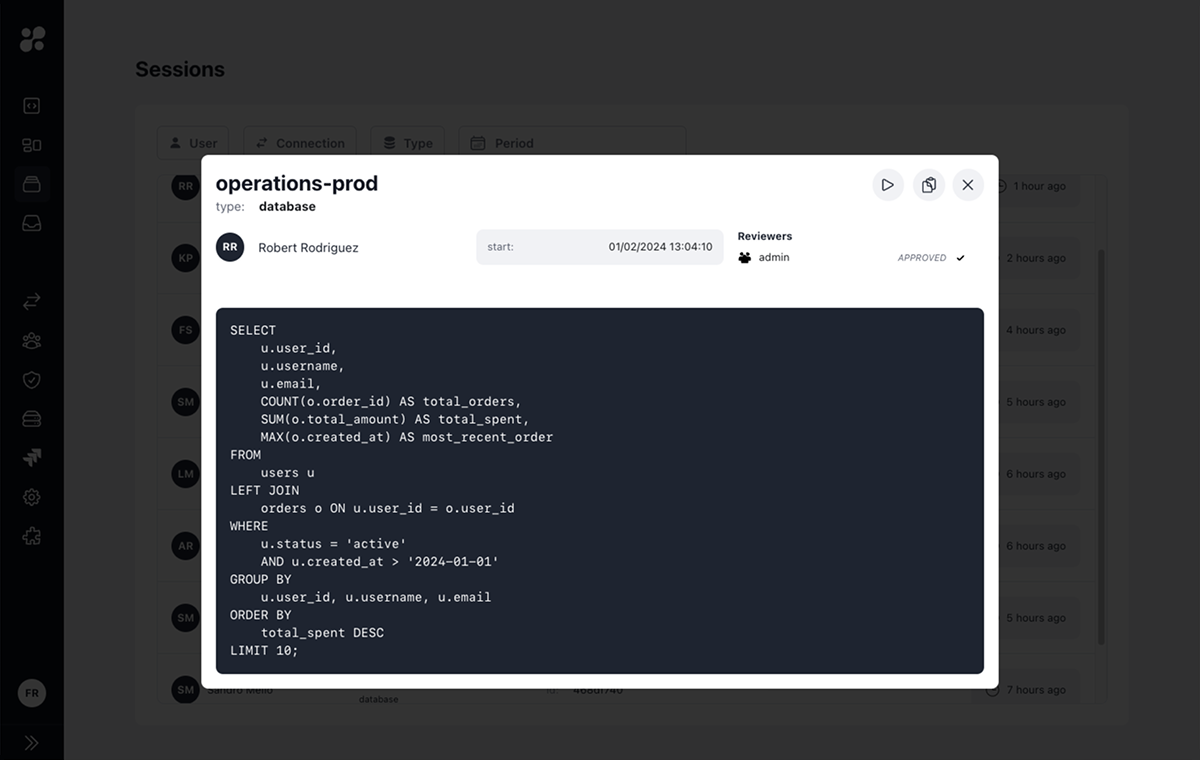
## Session Details

<Frame>
  <img src="https://mintcdn.com/hoopdev/iZLuH_-lVhW1Ey5L/images/learn/features/review-3.png?fit=max&auto=format&n=iZLuH_-lVhW1Ey5L&q=85&s=6f0440d761891b4155a784a544644256" alt="Session Details" width="1200" height="760" data-path="images/learn/features/review-3.png" />
</Frame>

Clicking on a session opens a detailed view that shows:

### Resource Role Information

* Session start and end times
* Resource role type and name
* User who initiated the session

### Activity Log

For database resource roles:

* SQL queries executed
* Query results
* Execution timestamps

For application and SSH resource roles:

* Commands executed
* Command output
* Terminal sessions

## Session Actions

From the session details view, you can:

* Re-run a query to verify results or troubleshoot issues
* Copy session ID for reference
* Download session logs
* Share session details with reviewers

## Integration with Access Requests

<CardGroup cols={2}>
  <Card title="JIT Access Requests" icon="clock">
    Sessions may require approval before starting if JIT access requests are enabled for the resource role
  </Card>

  <Card title="Action Access Requests" icon="terminal">
    Individual commands or queries may need approval during the session
  </Card>
</CardGroup>

## Best Practices

<CardGroup cols={2}>
  <Card title="Regular Audits" icon="magnifying-glass">
    Periodically review session logs for security and compliance
  </Card>

  <Card title="Investigation" icon="fingerprint">
    Use session IDs to track specific activities during incident response
  </Card>

  <Card title="Compliance" icon="check-double">
    Maintain session records for audit requirements
  </Card>

  <Card title="Performance" icon="chart-line">
    Monitor session patterns to optimize resource role usage
  </Card>
</CardGroup>

## Learn More

<CardGroup cols={2}>
  <Card title="JIT Access Requests" icon="shield-check" href="/learn/features/access-requests/jit">
    Learn about session approval workflows
  </Card>

  <Card title="Action Access Requests" icon="code" href="/learn/features/access-requests/action">
    Understand command-level approval processes
  </Card>
</CardGroup>